
Facebook leads · how-to
How to collect leads from Facebook Pages and Groups
Most small businesses keep a Facebook Page even when their website is out of date, and many list an email, phone number and opening hours on it. Facebook Groups add something no directory has: communities of buyers gathered around a topic.
This guide shows how to search Facebook for the businesses and groups you want, export the results with Scraper Pro (free for 1,000 results a month), and pull the contact details from a Page.
What you can collect from Facebook
| Search | Finds | Columns in your CSV |
|---|---|---|
| Pages | Businesses, brands and organisations by category and place | Name, category, followers, likes, details, verified, page link |
| Groups | Communities by topic or city (buyers, local business owners, hobbyists) | Name, privacy, members, activity, group link |
| People | Public profiles by name, work or city | Name, location, work, education, profile link |
| Events | Upcoming events by topic and city, with their organisers | Name, date, location, event link |
How far one run goes: what's on screen, or up to 1,000 results. The free plan includes 1,000 Facebook results every month, with no credit card.
How to collect leads from Facebook with Scraper Pro
First add Scraper Pro to Chrome and sign in with Google in its panel (once). Then:
- 1
Search Facebook
Type a category and city into Facebook's search (“dentist Phoenix”) and pick Pages, Groups, People or Events at the top of the results.
- 2
Choose how many results
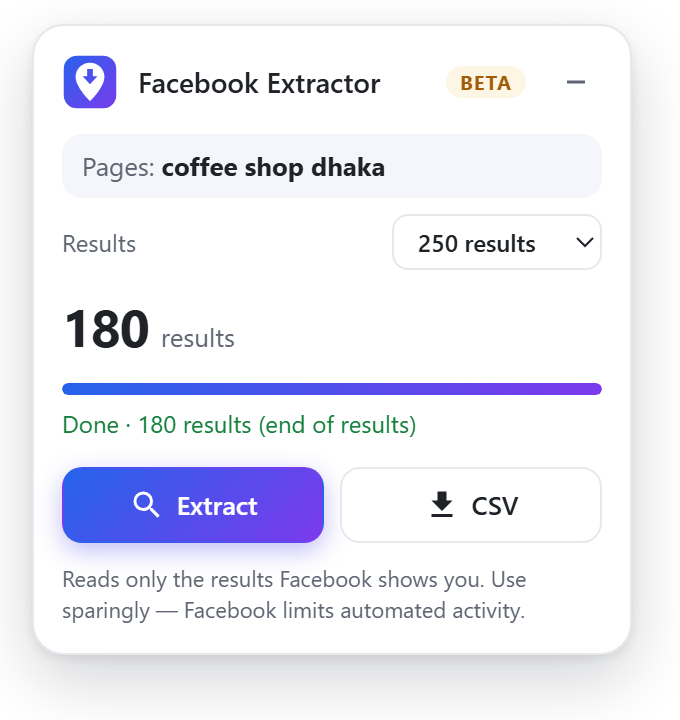
In the Scraper Pro panel, pick What's on screen, or 50, 100, 250, 500 or 1,000 results. Facebook loads more as the list is scrolled; the extension scrolls for you, with pauses.
- 3
Click Extract
Leave the tab open while it collects. You can stop at any time and keep everything read so far.
- 4
Download the CSV
Click CSV for an Excel-ready file. To get a Page's email and phone, open the Page itself and click Extract there (see below).
How to search Facebook for leads
Category plus place
Facebook search works best with what the business is and where: “roofing contractor Denver”, “yoga studio Brooklyn”. Use the Location filter on Pages.
Groups show demand
Search for the problem you solve (“small business marketing”, “first-time home buyers Austin”). Large, active groups are where your buyers ask questions.
Check activity
A Page that posted this week answers messages. Sort your CSV by followers, then open the most promising Pages to check their latest posts.
Events find organisers
Search events in your niche to find the businesses and people who run them: they're often the most connected people locally.
Example searches
| Goal | Search |
|---|---|
| Local businesses to pitch a website to | “bakery” · Pages · Location: Miami, FL |
| Communities of business owners | “small business owners Dallas” · Groups |
| Real estate agents | “realtor Phoenix” · Pages |
| Event organisers | “wedding expo” · Events |
From results to contact details
- A Facebook Page's Intro often lists an email address, phone number, website and address. Scraper Pro's Page export reads them for you.
- Search results themselves show the name, category, followers and link, so export the list first, then open the Pages worth contacting.
- Many Pages link to a website: run it through Scraper Pro's free Email Finder for more addresses.
- Messaging a Page through Messenger reaches the owner directly and is often answered faster than email.
The free Email Finder reads public emails, phone numbers and social profiles from any business website, and a Google Maps export gives local businesses' phone numbers, websites and emails in one go.
Export a single profile: Facebook Pages
Open one of the Facebook Pages and click Extract in the Scraper Pro panel. You get an overview file and, where there are posts, a posts file.
| File | What's in it |
|---|---|
| Overview | Name, category, followers, likes, rating, intro, address, phone, email, website, hours and price range, as the Page shows them. |
| Posts | Recent posts with text, link, reactions, comments, shares and date, plus figures worked out from them: average reactions and comments, engagement rate and posts per week. |
Personal profiles aren't exported, by design: only Pages.
New in version 0.21. If your copy is older, get the newest version.
Many searches at once
Building a list across many cities or job titles? Bulk search on the Business plan ($50/month) runs a whole list of Facebook searches from an Excel or CSV file and gives you one merged CSV with duplicates removed, or a file per search. Pro ($10/month) removes the monthly limit on every network.
Staying safe and compliant
- Facebook's terms restrict automated collection and Facebook may limit accounts it flags. Scraper Pro reads only what Facebook shows you, pauses between loads and caps a run at 1,000 results.
- Groups are communities, not mailing lists: read each group's rules before you post or message members.
- When you contact people, follow the law where they live (GDPR in Europe, CAN-SPAM in the US).
Facebook lead collection FAQ
How do I get business leads from Facebook?
Search Facebook for a category and city, choose Pages, and export the results with the free Scraper Pro Chrome extension. Then open the Pages worth contacting and export each one's email, phone and website.
Can I export Facebook Pages to Excel?
Yes. Scraper Pro saves Facebook Pages, Groups, people and events as a CSV that opens in Excel and Google Sheets: up to 1,000 results per search.
Can I get emails from Facebook Pages?
When a Page lists an email in its Intro, yes: open the Page and click Extract to export its email, phone, website, address and hours. Search results alone don't include emails.
Can I export Facebook Group members?
No. Scraper Pro exports the groups you find in search (name, members, activity, link), not their member lists.
Is it free?
Yes. The free plan includes 1,000 Facebook results every month, no credit card. Pro removes the limit.
Is it safe for my Facebook account?
It reads what Facebook already shows you, at a human pace with pauses, and caps runs at 1,000 results. Keep a reasonable pace and respect Facebook's rules and people's privacy.
More how-to guides
- Leads from LinkedInFind decision-makers by title and city, export LinkedIn people, companies and jobs to Excel, then find their contact details.
- Leads from InstagramFind business and creator accounts by hashtag, keyword and location, export them, and read public business emails.
- Leads from TikTokFind TikTok creators by hashtag and keyword, export videos and accounts with exact views and engagement, and compare them.
- Leads from YouTubeFind YouTube channels in your niche, export videos and channels, and get a channel's views, links and upload frequency.
- All social networks comparedWhat you can collect from each network, free.
Start collecting Facebook leads free
1,000 Facebook results every month, plus Google Maps, Google Search and every other network. No credit card.