
LinkedIn leads · how-to
How to collect leads from LinkedIn, step by step
LinkedIn is where B2B buyers list their job title, company and city, which makes it the best place to build a prospect list by role. The hard part is getting those search results out of LinkedIn and into a spreadsheet you can work with.
This guide shows how to search LinkedIn so the right people come up, how to export the results to CSV with Scraper Pro (free for 1,000 results a month), and how to get from a name and company to a way of reaching them.
What you can collect from LinkedIn
| Search | Finds | Columns in your CSV |
|---|---|---|
| People | Decision-makers and specialists by title, company, industry and city | Name, headline, location, current role and company, profile link |
| Companies | Businesses by industry, size and location | Company name, industry and location, followers, summary, page link |
| Jobs | Companies hiring for a role right now (a buying signal) | Job title, company, location, posted date, job link |
How far one run goes: this page, or up to 100 result pages. The free plan includes 1,000 LinkedIn results every month, with no credit card.
How to collect leads from LinkedIn with Scraper Pro
First add Scraper Pro to Chrome and sign in with Google in its panel (once). Then:
- 1
Search LinkedIn
Type the job title and city into LinkedIn's search bar and choose People (or Companies, or Jobs). Add filters such as Locations, Current company or Industry until the list is the one you want.
- 2
Choose how many pages
In the Scraper Pro panel, pick This page, or 3, 5, 10, 25 or 100 result pages. LinkedIn shows 10 people per page.
- 3
Click Extract
The extension reads each page and moves to the next with a pause in between, the way you would. Leave the tab open; you can stop at any time and keep what it has read.
- 4
Download the CSV
Click CSV. The file opens in Excel and Google Sheets with one row per result. Choose your columns and mark required ones in the popup's CSV settings.
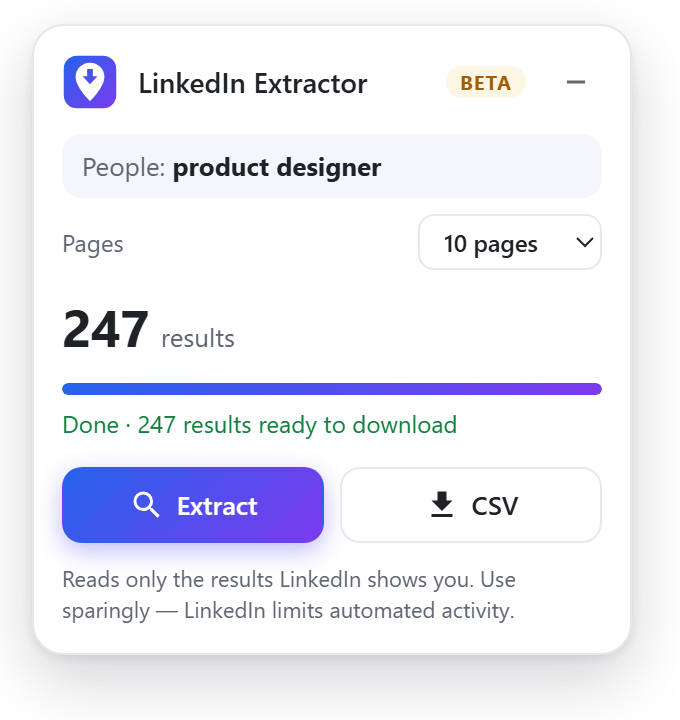
How to search LinkedIn for leads
Search by role, not by name
Job titles plus a city (“operations director Chicago”) give you a list of buyers. Add the seniority you sell to: owner, founder, head of, VP, director.
Use Boolean search
LinkedIn's keyword search understands quotes, AND, OR and NOT: “(CEO OR founder) AND roofing NOT intern”. Quotes keep a phrase together: “head of sales”.
Filter before you export
Locations, Current company, Industry and Connections filters cut the list to people you can actually sell to, so you export fewer, better rows.
Use Jobs as a signal
A company hiring a “marketing manager” is investing in marketing. Export Jobs results to find companies that need what you sell right now.
Example searches
| Goal | Search |
|---|---|
| Agency owners to sell software to | (owner OR founder) “marketing agency” · People · Locations: Texas |
| HR leaders at mid-size companies | “head of people” OR “HR director” · People · Company size 51-500 |
| Companies hiring salespeople | “sales development representative” · Jobs · Past week |
| Manufacturers in a state | manufacturing · Companies · Locations: Ohio |
From results to contact details
- LinkedIn search results don't include email addresses or phone numbers, and LinkedIn only shows contact info to someone's own connections.
- Use the company name to find the business website, then a free tool such as Scraper Pro's Email Finder to read public emails and phone numbers from that site.
- For local businesses, a Google Maps export with Scraper Pro gives phone numbers, websites and business emails directly, which you can match with the LinkedIn names.
- Connecting with a personal note and messaging on LinkedIn still works best for warm outreach; use the CSV to plan who to contact and track replies.
The free Email Finder reads public emails, phone numbers and social profiles from any business website, and a Google Maps export gives local businesses' phone numbers, websites and emails in one go.
Export a single profile: LinkedIn Company pages
Open one of the LinkedIn Company pages and click Extract in the Scraper Pro panel. You get an overview file and, where there are posts, a posts file.
| File | What's in it |
|---|---|
| Overview | Name, tagline, industry, company size, employees on LinkedIn, headquarters, founded year, type, specialties, website, phone, followers and description, read from the company's About page. |
| Posts | Company posts aren't included: the export is the company record. |
Personal profiles (/in/…) aren't exported, by design.
New in version 0.21. If your copy is older, get the newest version.
Many searches at once
Building a list across many cities or job titles? Bulk search on the Business plan ($50/month) runs a whole list of LinkedIn searches from an Excel or CSV file and gives you one merged CSV with duplicates removed, or a file per search. Pro ($10/month) removes the monthly limit on every network.
Staying safe and compliant
- LinkedIn's User Agreement restricts automated collection and LinkedIn may limit accounts that view too many pages too fast. Scraper Pro reads only results LinkedIn already shows you, pauses between pages and caps a run at 100 pages.
- Free LinkedIn accounts have a monthly commercial search limit; heavy searching can hit it whatever tool you use.
- When you contact people, follow the law where they live (GDPR in Europe, CAN-SPAM in the US) and say who you are and why you're writing.
LinkedIn lead collection FAQ
How do I collect leads from LinkedIn for free?
Search LinkedIn for people, companies or jobs, then click Extract in the free Scraper Pro Chrome extension. It exports names, headlines, locations, companies and profile links to CSV. The free plan includes 1,000 LinkedIn results every month; no credit card.
Can I export LinkedIn search results to Excel?
Yes. Scraper Pro saves LinkedIn people, company and job results as a UTF-8 CSV that opens directly in Excel and Google Sheets, one row per result.
Do I need LinkedIn Sales Navigator?
No. Scraper Pro works with LinkedIn's regular search, so a free LinkedIn account is enough. Sales Navigator gives more filters, but you don't need it to export results.
Does it get email addresses from LinkedIn?
No. LinkedIn search results don't show emails. Use the company name to find the website and a tool like Scraper Pro's free Email Finder to get public contact details.
How many LinkedIn leads can I export at once?
Up to 100 result pages in one run (about 1,000 people). The free plan includes 1,000 LinkedIn results a month; Pro is unlimited.
Is it safe for my LinkedIn account?
It reads only results LinkedIn shows you, at a human pace with pauses, and caps runs at 100 pages. LinkedIn's rules restrict automated collection, so keep a reasonable pace and avoid exporting all day.
Can I export a LinkedIn company page?
Yes, from version 0.21: open a company page and click Extract to save its details (industry, size, headquarters, website, phone, specialties, followers) from its About page. Personal profiles aren't exported.
More how-to guides
- Leads from FacebookSearch Facebook Pages and Groups by category and city, export them to CSV, and read a Page's email, phone and website.
- Leads from InstagramFind business and creator accounts by hashtag, keyword and location, export them, and read public business emails.
- Leads from TikTokFind TikTok creators by hashtag and keyword, export videos and accounts with exact views and engagement, and compare them.
- Leads from YouTubeFind YouTube channels in your niche, export videos and channels, and get a channel's views, links and upload frequency.
- All social networks comparedWhat you can collect from each network, free.
Start collecting LinkedIn leads free
1,000 LinkedIn results every month, plus Google Maps, Google Search and every other network. No credit card.