Instagram leads · how-to
How to find leads on Instagram: business accounts, emails and hashtags
Instagram is where local shops, salons, restaurants, coaches and creators show their work, and business accounts can list a public email, phone number and address. That makes it a strong source for agencies, brands looking for creators, and anyone selling to small businesses.
This guide shows how to find the right accounts through hashtags, keywords and locations, export them with Scraper Pro (free for 1,000 results a month), and get the public contact details of business accounts.
What you can collect from Instagram
| Search | Finds | Columns in your CSV |
|---|---|---|
| Accounts | Accounts matching a name or keyword (Instagram returns about 50) | Username, full name, followers, verified, profile link |
| Keywords | Posts about a topic, and the accounts behind them | Post link, account, caption, hashtags, likes, comments, views, date |
| Hashtags | Posts under a hashtag: niche plus city works best | Post link, account, caption, hashtags, likes, comments, views |
| Locations | Posts tagged at a place: a neighbourhood, venue or city | Post link, account, caption, likes, comments, date |
How far one run goes: all account results, or up to 1,000 posts. The free plan includes 1,000 Instagram results every month, with no credit card.
How to collect leads from Instagram with Scraper Pro
First add Scraper Pro to Chrome and sign in with Google in its panel (once). Then:
- 1
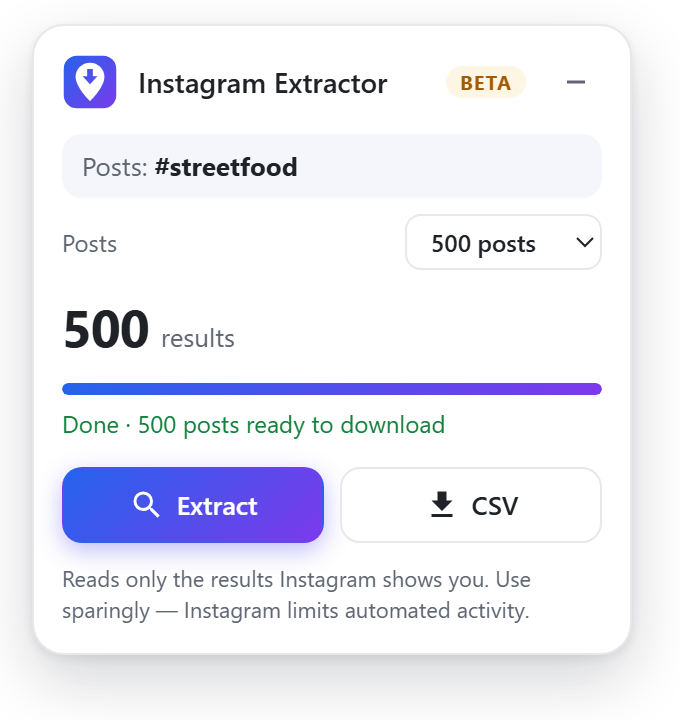
Search Instagram
Search accounts in the search panel, or open a hashtag (instagram.com/explore/tags/…), keyword or location page.
- 2
Choose how many posts
For hashtag, keyword and location pages, pick what's on screen or up to 1,000 posts. Account searches export every account Instagram returns.
- 3
Click Extract
The extension scrolls the grid with generous pauses. Leave the tab open; stop any time and keep what it has read.
- 4
Download the CSV
Click CSV. Sort by likes or followers to find the most active accounts, then open the business profiles worth contacting.
How to search Instagram for leads
Niche plus city hashtags
#miamisalon, #austinrealtor, #chicagobakery: local hashtags bring up local businesses, not global brands.
Location pages
A neighbourhood or mall's location page shows the businesses and visitors posting there: ideal for local services.
Look for business accounts
Business and creator accounts show a category under the name (“Marketing Agency”) and Email, Call or Directions buttons: those are the ones with public contact details.
Engagement beats followers
For creator outreach, an account with 8,000 followers and 400 likes a post is worth more than one with 80,000 and 200. Compare likes to followers.
Example searches
| Goal | Search |
|---|---|
| Salons to offer booking software to | #miamisalon · Hashtag |
| Food creators for a brand campaign | “food blogger nyc” · Accounts |
| Businesses in a shopping area | Location page: The Grove, Los Angeles |
| Fitness coaches | #onlinefitnesscoach · Hashtag |
From results to contact details
- Business and creator accounts can show a public email, phone and address on their profile. Scraper Pro's account export reads them for you.
- Most bios link to a website or a link page (Linktree and similar): open it, or run the website through Scraper Pro's free Email Finder.
- Search results and hashtag grids give you the accounts; open the profiles worth contacting to get their details.
- A direct message works well for creators and small shops; keep it short and personal.
The free Email Finder reads public emails, phone numbers and social profiles from any business website, and a Google Maps export gives local businesses' phone numbers, websites and emails in one go.
Export a single profile: Instagram business and creator accounts
Open one of the Instagram business and creator accounts and click Extract in the Scraper Pro panel. You get an overview file and, where there are posts, a posts file.
| File | What's in it |
|---|---|
| Overview | Username, name, account type, category, bio, website and bio links, public business email, phone and address, followers, following and post count. |
| Posts | Recent posts with caption, likes, comments, views, date and location, plus average likes and comments, engagement rate and posts per week. |
Personal and private accounts aren't exported, by design.
New in version 0.21. If your copy is older, get the newest version.
Many searches at once
Building a list across many cities or job titles? Bulk search on the Business plan ($50/month) runs a whole list of Instagram searches from an Excel or CSV file and gives you one merged CSV with duplicates removed, or a file per search. Pro ($10/month) removes the monthly limit on every network.
Staying safe and compliant
- Instagram's terms restrict automated collection and Instagram limits accounts it flags. Scraper Pro reads only what Instagram shows you, pauses generously between loads and caps a run at 1,000 posts.
- Contact business accounts through the details they chose to make public, and respect people who say no.
- When you email people, follow the law where they live (GDPR in Europe, CAN-SPAM in the US).
Instagram lead collection FAQ
How do I find leads on Instagram?
Search a niche hashtag or keyword, or open a location page, then export the accounts and posts with the free Scraper Pro Chrome extension. Open the business accounts worth contacting to export their public email, phone and address.
Can I get emails from Instagram?
From business and creator accounts that show a public email, yes: open the profile and click Extract. Personal accounts don't show emails, and Scraper Pro doesn't export them.
Can I export Instagram followers?
No. Scraper Pro exports accounts and posts you find through search, hashtags and locations, not follower lists.
How do I find Instagram influencers in a niche?
Search niche hashtags and keywords, export the posts, then sort by likes and comments. Export the promising creators' profiles to compare their engagement rate and posting frequency.
Is it free?
Yes. The free plan includes 1,000 Instagram results every month, no credit card. Pro removes the limit.
Is it safe for my Instagram account?
It reads what Instagram already shows you, with generous pauses, and caps runs at 1,000 posts. Collect at a reasonable pace and respect Instagram's rules.
More how-to guides
- Leads from LinkedInFind decision-makers by title and city, export LinkedIn people, companies and jobs to Excel, then find their contact details.
- Leads from FacebookSearch Facebook Pages and Groups by category and city, export them to CSV, and read a Page's email, phone and website.
- Leads from TikTokFind TikTok creators by hashtag and keyword, export videos and accounts with exact views and engagement, and compare them.
- Leads from YouTubeFind YouTube channels in your niche, export videos and channels, and get a channel's views, links and upload frequency.
- All social networks comparedWhat you can collect from each network, free.
Start collecting Instagram leads free
1,000 Instagram results every month, plus Google Maps, Google Search and every other network. No credit card.