
TikTok leads · how-to
How to find TikTok creators and leads for marketing
TikTok is where brands find creators and where a growing number of local businesses post every day. The numbers that matter (views, likes, shares, how often someone posts) are all on the page, but comparing dozens of creators by hand takes hours.
This guide shows how to search TikTok for creators and businesses in your niche, export videos and accounts with exact engagement numbers using Scraper Pro (free for 1,000 results a month), and decide who to contact.
What you can collect from TikTok
| Search | Finds | Columns in your CSV |
|---|---|---|
| Videos | Videos about a topic, and the creators who made them | Video link, username, caption, hashtags, views, likes, comments, shares, saves, music, date |
| Users | Accounts matching a keyword | Username, nickname, followers, likes, video count, bio, verified |
| Hashtags | Videos under a hashtag (tiktok.com/tag/…) | Same as Videos |
How far one run goes: what's on screen, or up to 1,000 results. The free plan includes 1,000 TikTok results every month, with no credit card.
How to collect leads from TikTok with Scraper Pro
First add Scraper Pro to Chrome and sign in with Google in its panel (once). Then:
- 1
Search TikTok
Search a keyword and pick Videos or Users, or open a hashtag page (tiktok.com/tag/…).
- 2
Choose how many results
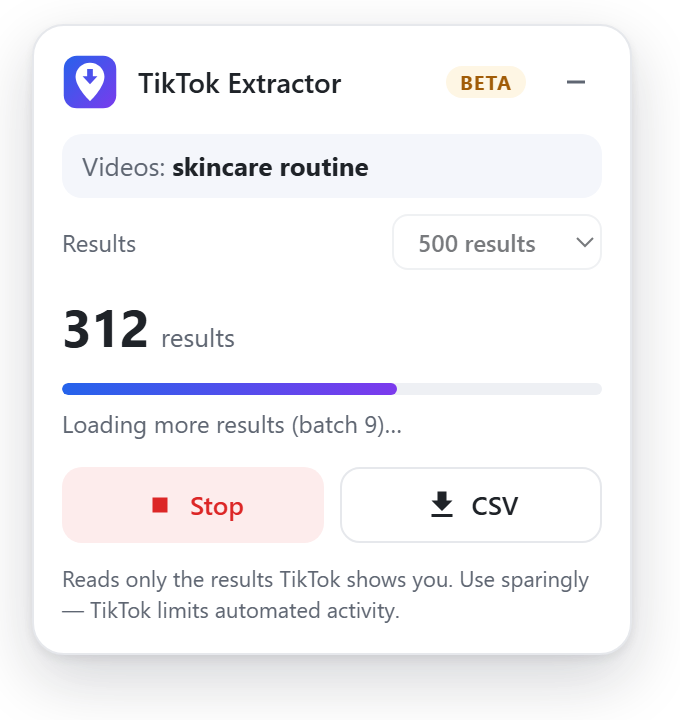
In the Scraper Pro panel, pick what's on screen, or 50, 100, 250, 500 or 1,000 results. The extension scrolls (and clicks Load more) with pauses.
- 3
Click Extract
Leave the tab open while it collects. If TikTok asks you to confirm you're human, do it and click Extract again.
- 4
Download the CSV
Click CSV. Sort by views or by likes per view to find creators whose audience actually engages.
How to search TikTok for leads
Search the problem, not the brand
Creators who answer “how to fix dry skin” reach buyers; search the questions your customers ask.
Compare engagement, not followers
Likes, comments and shares divided by views (or by followers) show who has an engaged audience. The export gives exact numbers, not “1.2M”.
Check consistency
Export a creator's recent videos to see how often they post and whether their views are steady or one viral hit.
Local businesses post too
Search “[service] [city]” (“barber Houston”) to find local businesses that are active on TikTok and likely to buy marketing.
Example searches
| Goal | Search |
|---|---|
| Skincare creators for product seeding | #skincaretips · Hashtag |
| Fitness creators by keyword | “home workout” · Users |
| Local restaurants on TikTok | “restaurant austin” · Videos |
| Real estate agents | #realtorlife · Hashtag |
From results to contact details
- TikTok bios often include an email or a link (a website or a link page): the export saves the bio and bio link.
- Many creators list a business email in their bio for brand deals; check the bio column first.
- For businesses, run the bio link's website through Scraper Pro's free Email Finder.
- Creator marketplaces and direct messages are the other routes; keep your first message short and specific.
The free Email Finder reads public emails, phone numbers and social profiles from any business website, and a Google Maps export gives local businesses' phone numbers, websites and emails in one go.
Export a single profile: TikTok accounts
Open one of the TikTok accounts and click Extract in the Scraper Pro panel. You get an overview file and, where there are posts, a posts file.
| File | What's in it |
|---|---|
| Overview | Username, name, verified, bio, bio link, followers, following, total likes, video count, join date and business category. |
| Posts | Recent videos with caption, hashtags, views, likes, comments, shares, saves, length and date, plus average views and likes, engagement rate and posts per week. |
Private accounts aren't exported: their videos aren't public.
New in version 0.21. If your copy is older, get the newest version.
Many searches at once
Building a list across many cities or job titles? Bulk search on the Business plan ($50/month) runs a whole list of TikTok searches from an Excel or CSV file and gives you one merged CSV with duplicates removed, or a file per search. Pro ($10/month) removes the monthly limit on every network.
Staying safe and compliant
- TikTok's terms restrict automated collection and TikTok limits accounts it flags. Scraper Pro reads only what TikTok shows you, pauses generously between loads and caps a run at 1,000 results.
- TikTok sometimes asks you to confirm you're human: do it yourself; the extension never tries to get around it.
- When you contact creators, be clear about who you are and what you offer, and follow the law where they live.
TikTok lead collection FAQ
How do I find TikTok influencers for free?
Search a niche keyword or hashtag on TikTok, then export the videos or users with the free Scraper Pro Chrome extension. Sort the CSV by views and engagement, then export the best creators' profiles to compare them.
Can I export TikTok videos to Excel?
Yes. Scraper Pro saves TikTok videos with exact views, likes, comments, shares, saves, music and posting date as a CSV for Excel or Google Sheets: up to 1,000 per search.
How do I calculate a TikTok creator's engagement rate?
Add up likes, comments and shares per video and divide by views (or by followers). Scraper Pro's account export works out the average engagement rate from the videos it collects.
Can I get a TikTok creator's email?
If they put it in their bio, it's in the bio column. Scraper Pro also saves the bio link, which often leads to a website with contact details.
Is it free?
Yes. The free plan includes 1,000 TikTok results every month, no credit card. Pro removes the limit.
Is it safe for my TikTok account?
It reads what TikTok already shows you, with generous pauses, and caps runs at 1,000 results. If TikTok asks you to confirm you're human, do it and continue.
More how-to guides
- Leads from LinkedInFind decision-makers by title and city, export LinkedIn people, companies and jobs to Excel, then find their contact details.
- Leads from FacebookSearch Facebook Pages and Groups by category and city, export them to CSV, and read a Page's email, phone and website.
- Leads from InstagramFind business and creator accounts by hashtag, keyword and location, export them, and read public business emails.
- Leads from YouTubeFind YouTube channels in your niche, export videos and channels, and get a channel's views, links and upload frequency.
- All social networks comparedWhat you can collect from each network, free.
Start collecting TikTok leads free
1,000 TikTok results every month, plus Google Maps, Google Search and every other network. No credit card.